Your Guide to Chatbot Lead Generation and Smart Conversions
Discover how to master chatbot lead generation. Learn to design smart conversation flows, qualify leads automatically, and boost your conversion rates.So, what exactly is chatbot lead generation?
Think of it as having a super-efficient sales assistant working on your website 24/7. These automated conversational bots are designed to spot potential customers, collect their info, and figure out just how interested they are in what you're selling.
Instead of just waiting for someone to fill out a static form, you’re actively engaging them, answering their questions on the spot, and guiding them toward a sale. It’s a far more dynamic and personal way to kick off a relationship.
Why Your Static Forms Are Losing You Customers
Let's be honest, those old-school "contact us" forms are a bit of a relic. They feel cold and transactional, asking for someone's details without giving anything of value in return. It's a one-way street, and it’s often a dead end where potential customers just click away.
This old-fashioned approach is a massive missed opportunity, especially now when buyers expect instant answers and a helping hand. It's time to move on from just passively collecting data and start having real conversations. For any business that wants to grow, this isn't just a "nice-to-have"—it's essential.
This guide will walk you through a much smarter way to generate leads with chatbots. We’ll break down how top companies are using conversational AI to:
- Deliver helpful, on-the-spot answers anytime, day or night.
- Craft personalized experiences that walk visitors through their decision-making process.
- Build real connections right from that first interaction.
The Shift to Conversational Engagement
The real killer of the "fill this out and we'll get back to you" model is the delay. You're creating a roadblock right at the moment a potential customer is most engaged.
A chatbot, on the other hand, bridges that gap instantly. It acts like a digital concierge, always ready to help, field questions, and qualify a lead's intent in real-time. This isn't just about grabbing contact details; it's about making the entire customer experience better from the get-go.
The results speak for themselves. Businesses that switch to AI chatbots almost always see a major lift in converting website traffic into actual, qualified leads. It's not just about getting more names in a database; it's about starting more valuable sales conversations, much faster.
The data proves it. Fresh 2025 statistics reveal that businesses using AI chatbots see a 23% jump in conversion rates compared to those still stuck on static forms. That boost comes directly from the chatbot's ability to engage visitors with immediate, personalized replies that make it easier for them to decide.
You can dig deeper into these AI chatbot conversion statistics and see what they really mean for your bottom line. This playbook is your roadmap to building a strategy that truly impacts your sales pipeline, from defining your goals all the way to measuring what actually works.
Laying the Strategic Groundwork
A great chatbot isn’t just about clever tech; it’s built on a solid, clear-headed strategy. Before you even think about designing a conversation, you have to define what success actually looks like for your business. Jumping in without clear goals is like building a house without a blueprint—it might stand, but it won’t work the way you need it to.
Your goals will steer every decision you make, from the questions your bot asks to the pages it lives on. Are you trying to book more demos for your sales team? Is the big objective to boost marketing qualified leads (MQLs) by 20% this quarter? Maybe you just want to shorten the sales cycle by qualifying people before a human ever gets involved.
Each of those goals demands a different playbook. A bot designed to book meetings needs to sync with calendars and ask about availability. A bot focused on growing your MQL list might be better off capturing emails in exchange for a helpful guide or whitepaper.
Define Your Key Performance Indicators
Once you have your main goal locked in, you need to attach real, measurable Key Performance Indicators (KPIs) to it. Vague targets like "get more leads" are useless. You need hard numbers to track your progress and justify the investment in the first place.
Here's a breakdown of the essential metrics you should be tracking to understand both the volume and quality of your chatbot-generated leads.
Key Performance Indicators for Chatbot Lead Generation
| Metric Category | KPI | What It Measures | Example Goal |
|---|---|---|---|
| Lead Quantity | Conversation Started Rate | The percentage of site visitors who engage with the chatbot. | Achieve a 10% engagement rate on the pricing page. |
| Lead Quantity | Lead Capture Rate | The percentage of conversations that result in capturing contact information. | Capture an email from 30% of all engaged visitors. |
| Lead Quality | Lead Qualification Rate | The percentage of captured leads that meet your pre-defined MQL/SQL criteria. | Ensure 60% of captured leads are qualified. |
| Lead Quality | Meeting Booked Rate | The percentage of qualified leads who schedule a meeting via the bot. | Book a demo with 25% of all qualified leads. |
| Business Impact | Cost Per Qualified Lead | The total cost of the chatbot divided by the number of qualified leads generated. | Keep CPL under $50, beating paid ad channels. |
| Business Impact | Chatbot-Influenced Revenue | The total revenue generated from leads that first interacted with the chatbot. | Attribute $100,000 in new revenue to the chatbot this quarter. |
Tracking these KPIs is non-negotiable. They give you the data you need to prove ROI and make smart tweaks to your strategy. Without them, you’re just guessing whether your chatbot lead generation efforts are actually paying off.
Pinpoint High-Impact Places for Your Bot
Slapping a chatbot on every single page of your website is a mistake. To get the best results, you need to be strategic and place it where high-intent visitors are most likely to have questions or be ready to act.
Think about these prime locations:
- Your Pricing Page: People on this page are in evaluation mode. A chatbot can instantly answer questions about features, clarify pricing tiers, and guide them to the right plan—all while capturing their info.
- High-Intent Blog Posts: Have a post comparing your product to a competitor? That's a goldmine. A bot can pop up and ask, "Have any questions about how we stack up?" and route hot leads straight to sales.
- Product & Service Pages: When someone is deep-diving into your core offerings, a bot can proactively offer to book a demo or answer a specific question about a feature they're reading about.
This is how chatbots completely change the old, static lead capture game. You move from passive forms to active, helpful conversations.
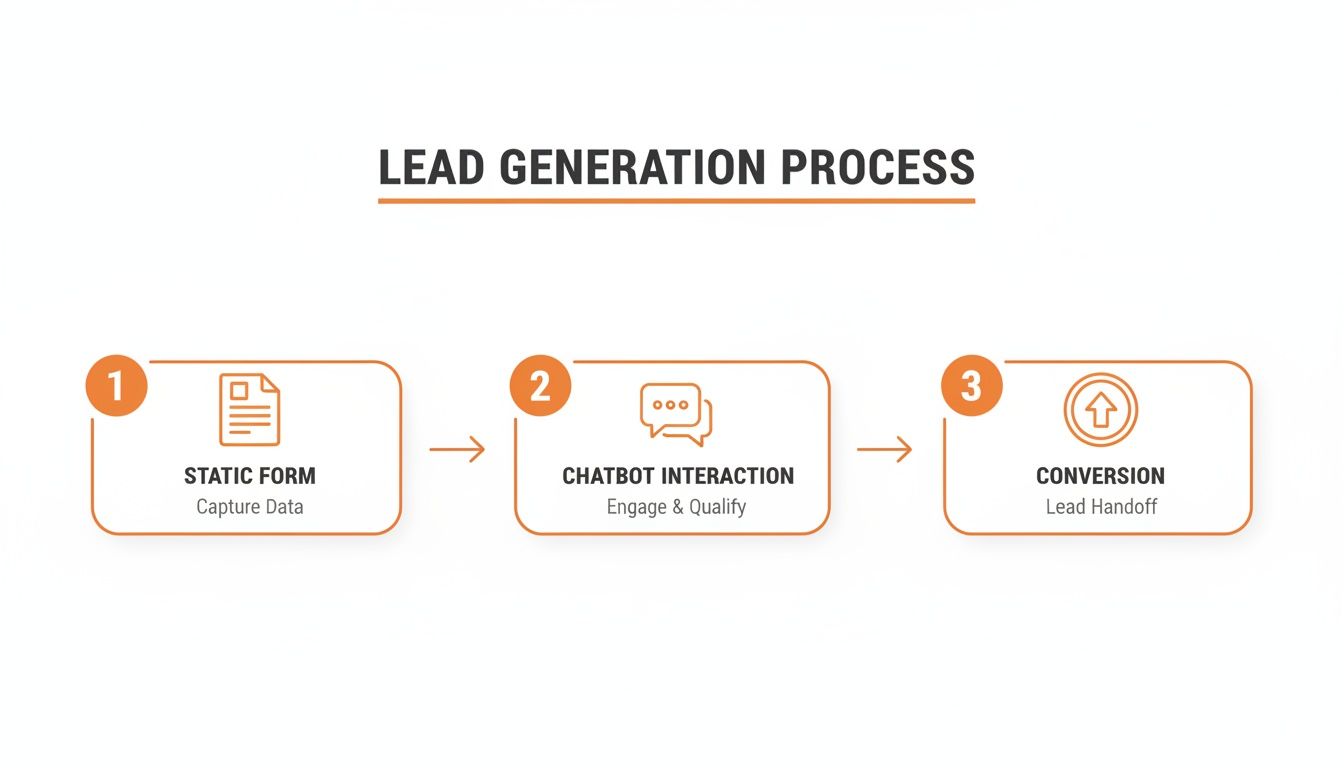
The flow is simple: you replace a point of friction (a boring form) with a dynamic interaction that actually helps the user, leading to much better conversion.
A well-placed chatbot does more than just grab an email. It acts as a gatekeeper, making sure your sales team only spends time talking to people who are a genuine fit. It’s all about quality, not just quantity.
This filtering is a huge win for sales efficiency. It's no surprise that 55% of companies say they get higher-quality leads after putting a chatbot in place. They’re masters of qualification, asking direct questions like, "What's your team size?" or "What's your biggest challenge with X?" to weed out tire-kickers early on. If you want to dive deeper into the numbers, you can read the full findings on chatbot lead quality.
Ultimately, this pre-qualification work ensures your sales team’s pipeline is filled with valuable opportunities, not just a long list of dead-end contacts.
Designing Conversations That Actually Convert
Here's a hard truth: a chatbot's success isn't about how many conversations it starts. It’s about how many qualified leads it hands over to your team. The real magic in chatbot lead generation happens when you script conversations that feel less like a quiz and more like a genuinely helpful chat with a smart assistant.
It's time to move past the robotic, one-size-fits-all scripts. A great chatbot workflow guides, qualifies, and converts with a surprisingly human touch.
The first few seconds are everything. Your chatbot’s opening line, or "hook," has to grab a visitor's attention and prove its worth immediately. A generic "How can I help you?" is a surefire way to get ignored.
Instead, think context. If someone's on your pricing page, a much stronger opener is: "Comparing our plans? I can help you find the perfect fit for your team size and goals. Sound good?" Right away, the bot shows it understands the visitor's goal and offers a clear, immediate benefit.
Crafting a Natural Conversational Flow
Once you’ve got their attention, the goal is to gather information without making it feel like pulling teeth. I've found the best way to do this is by mixing pre-defined buttons with a few open-ended questions.
Buttons are fantastic for speed. They make it easy for users to move forward and guide them down specific paths. Quick, simple, and low-effort.
But a conversation built only on buttons can feel rigid and limiting. Try sprinkling in an open-ended question like, "What's the main challenge you're hoping to solve with a tool like ours?" This simple question can uncover incredibly rich insights. You let prospects use their own words, giving your sales team valuable context that a multiple-choice answer never could. It also just feels more like a real conversation.
The golden rule I always follow is this: offer value before you ask for anything. Don't open with a demand for their email. First, help them solve a problem, answer a question, or find a resource. Once you've proven you're helpful, they'll be far more willing to give you their contact info.
This visual from the team at Drift shows a simple but effective workflow that branches out based on what the user needs.

You can see how a single welcome message splits into different paths for B2B leads versus general questions, making sure everyone gets a relevant experience.
Building Smart Branching Logic
Your website visitors aren't all the same. They have different goals, different problems, and are at different stages of their buying journey. That's where branching logic comes in—it’s non-negotiable for designing conversations that actually convert. You're essentially creating different conversational paths based on how a user answers your questions.
For example, a visitor who says their company has 500+ employees is an enterprise-level lead. They need a completely different, more high-touch path than someone from a 1-10 person startup.
Here’s how you can start structuring that logic:
- Segment by Role: Ask visitors who they are. Are they a "Marketing Manager," "Sales Director," or a "Founder"? This lets you speak directly to their specific pain points.
- Qualify by Need: A few simple questions can tell you their intent. Are they just browsing, or are they ready to buy now? A user who clicks "I need a demo" is a hot lead who should be sent straight to a calendar booking link. No delays.
- Route by Urgency: Someone asking about "implementation timelines" is much further down the funnel than someone asking "what is [your product]?" The urgent lead needs a fast track to a human.
This kind of segmentation is crucial. It ensures your high-value leads get the VIP treatment while those still kicking the tires are nurtured with helpful content, all without tying up your sales reps' valuable time.
Real-World Scripting Examples
Alright, let's get practical. A well-designed script is the engine that drives your chatbot. Here are two examples—one B2B, one B2C—that focus on qualifying leads and moving them to the next step.
B2B SaaS Lead Qualification Script
This script is all about making sure the lead is a good fit before offering up a demo.
- Welcome Hook: "Hey there! Looking for a way to streamline your project management? I can help you figure out if CallCow is the right fit. Are you currently using a project management tool?"
- Buttons: "Yes, we are" / "No, not yet"
- Company Size Question: "Got it. So I can give you the most relevant info, how large is your team?"
- Buttons: "1-10" / "11-50" / "51-200" / "200+"
- Pain Point Discovery (Open-Ended): "Thanks! What's the biggest challenge you're facing with managing projects right now?"
- Value Proposition & CTA: "That's a common challenge. Our AI-powered workflows are designed to solve exactly that by automating task assignments. Would a quick 15-minute demo showing how it works be helpful?"
- Buttons: "Yes, schedule a demo" / "No thanks, just browsing"
B2C Real Estate Lead Capture Script
This one is designed to quickly capture a buyer's interest and get a viewing on the books.
- Welcome Hook: "Hi! Interested in this property? I can answer any questions you have or even schedule a viewing for you. What can I help you with?"
- Buttons: "Ask a question" / "Schedule a viewing"
- Qualifying Interest: (If "Schedule a viewing") "Great! Just to make sure this property is a good match, are you pre-approved for a mortgage?"
- Buttons: "Yes, I am" / "I'm working on it" / "I'm not sure"
- Gathering Contact Info: "Perfect. What's the best email address to send the viewing confirmation to?"
- Booking the Appointment: "Thanks! Our agent has time tomorrow at 2 PM or Saturday at 11 AM. Does either of those work for you?"
In both of these scenarios, the script is helpful, direct, and qualifies the lead piece by piece before asking for a big commitment. This approach respects the user's time and builds the trust you need for successful chatbot lead generation.
Connecting Your Chatbot to Your Workflow
A chatbot that works in isolation is like a salesperson who never reports back to the team—it's a massive missed opportunity. To build a truly efficient engine for chatbot lead generation, you have to connect it to the tools your business already runs on. An unintegrated bot is just a conversation; an integrated bot is a pipeline-building machine.
Think of it this way: your chatbot is the friendly face at the front door, greeting visitors, understanding their needs, and qualifying them. But once that initial conversation is over, the information it gathers needs to go somewhere useful. Manually copying and pasting lead data from your chatbot platform into your CRM is a tedious, error-prone process that completely defeats the purpose of automation.
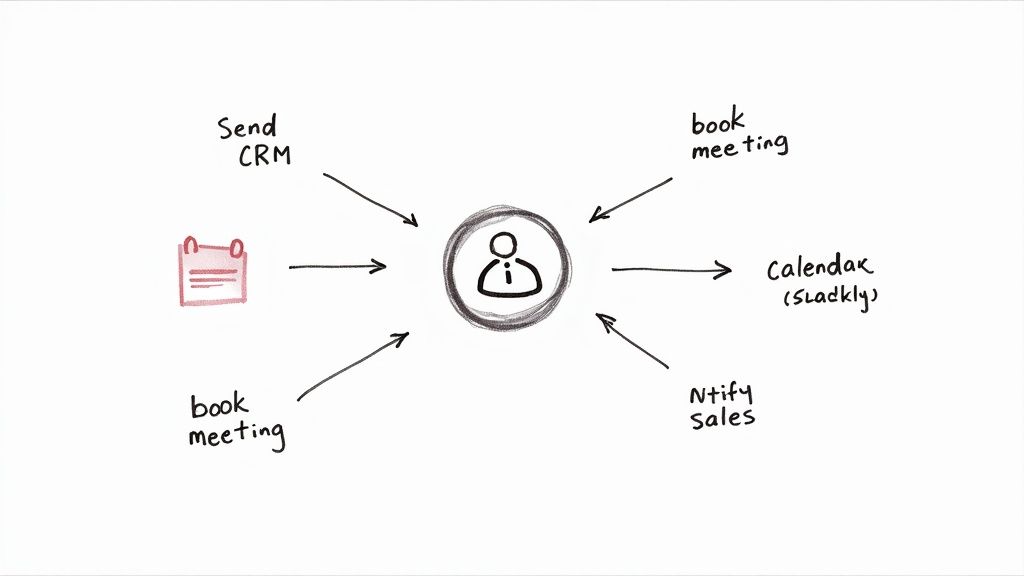
The real magic happens when your chatbot seamlessly passes crucial data to your other systems in real time. This creates a smooth, automated workflow from the very first click all the way to a sales handoff.
Send Leads Directly to Your CRM
The most fundamental integration you can set up is with your Customer Relationship Management (CRM) system. Whether you use HubSpot, Salesforce, or Zoho, this connection is non-negotiable.
When a chatbot identifies a qualified lead, it should automatically create a new contact or deal right inside your CRM. This simple step ensures no lead ever falls through the cracks. More importantly, it populates that contact record with all the valuable context the bot collected during the conversation.
This isn't just about sending over a name and email. A powerful integration will pass along:
- Full chat transcripts so sales reps can see the entire conversation.
- Answers to qualifying questions like company size, budget, and pain points.
- The specific page the user was on when they started the chat, giving reps valuable intent data.
This rich context lets your sales team have much smarter, more personalized follow-up conversations. Instead of a cold outreach, they can start with, "I see you were asking the chatbot about our enterprise plan and mentioned your biggest challenge is X..."
Let Qualified Leads Book Meetings Instantly
One of the biggest friction points in any sales process is the endless back-and-forth of scheduling a meeting. A chatbot integrated with a calendar tool like Calendly or SavvyCal eliminates this problem entirely.
Once your bot qualifies a lead based on your criteria—maybe they have a team of over 50 and a specific need your product solves—it can immediately present them with a link to book a demo. The user picks a time that works for them, and the event is automatically added to the right sales rep's calendar.
This simple integration can dramatically shorten your sales cycle. You're moving a high-intent prospect from initial inquiry to a booked meeting in a single, seamless interaction, often in under two minutes.
This workflow capitalizes on peak interest. You don't give the lead time to get distracted or check out a competitor. You give them a direct path to action the moment they're most engaged.
Notify Your Sales Team in Real Time
What about those red-hot leads who need immediate attention? This is where integrating your chatbot with a team communication tool like Slack or Microsoft Teams comes in.
You can set up rules to trigger instant notifications for high-value actions. For example, if a visitor from a target account with over 1,000 employees engages with the bot on your pricing page, you can send an alert directly to your enterprise sales channel in Slack.
This notification should include the key details:
- The lead's name and company.
- A summary of their qualifying answers.
- A direct link to jump into the conversation live.
This allows a sales rep to take over from the bot and engage the high-value prospect right then and there, striking while the iron is hot.
The impact of this kind of automated workflow is profound. AI-driven chatbots are enabling firms to generate over 50% more sales-ready leads while simultaneously achieving cost reductions of up to 60%. This powerful combination is a key driver behind the chatbot market's projected growth to $27.29 billion by 2030. You can explore more about the lead generation statistics behind this growth to see how automation is changing the sales game.
By connecting your systems, you create a powerful, cohesive workflow that ensures every lead is captured, qualified, routed, and followed up on with maximum efficiency. This is how you transform your chatbot from a simple Q&A tool into the central hub of your chatbot lead generation strategy.
Real-World Chatbot Playbooks for Your Industry
<iframe width="100%" style="aspect-ratio: 16 / 9;" src="https://www.youtube.com/embed/hHedypRY9dg" frameborder="0" allow="autoplay; encrypted-media" allowfullscreen></iframe>Theory only gets you so far. The best way to really grasp the power of chatbot lead generation is to see it in action. So, let's move past the abstract and dive into some practical, industry-specific playbooks you can adapt for your own business.
These examples show how a well-designed bot can handle nuanced conversations and drive high-value actions—whether that's booking a property viewing, scheduling a legal consultation, or getting a hot prospect onto a SaaS demo.
The Real Estate Agent Playbook
For real estate agents, speed and availability are the name of the game. A potential buyer browsing listings at 10 PM on a Tuesday isn't going to wait until morning for a response. A chatbot engages them right away, grabbing crucial details and qualifying their intent on the spot.
The primary goal here is to sift through the casual browsers to find serious buyers and get them booked for a viewing. Your bot essentially becomes a 24/7 digital assistant, making sure no lead ever goes cold.
How a Conversation Might Flow:
- Opener: "Hi! Interested in this property? I can answer questions or schedule a private viewing for you. What can I help with?"
- Buttons: "Schedule a Viewing" / "Ask a Question"
- Initial Qualification: (If they click "Schedule a Viewing") "Great! Just to make sure this home is a good fit, are you currently working with an agent?"
- Buttons: "Yes, I have an agent" / "No, I'm on my own"
- Financial Check: "Thanks for letting me know. Have you already been pre-approved for a mortgage?"
- Buttons: "Yes, I'm pre-approved" / "I'm in the process" / "I need a recommendation"
- Booking the Appointment: "Perfect. What's the best email to send viewing confirmations to? Once I have that, I'll show you our agent's live calendar."
This kind of script instantly segments your leads. A pre-approved buyer without an agent is a top-priority lead who should be fast-tracked. Someone who needs a lender recommendation, on the other hand, can be nurtured with helpful resources first.
The Law Firm Playbook
Law firms often deal with sensitive, urgent inquiries. A chatbot offers a confidential, no-pressure way for potential clients to get information and see if they have a case, all while qualifying them for the right legal team.
Here, the main objective is to handle the initial client intake, figure out the right practice area, and schedule a consultation with the appropriate attorney. This frees up an incredible amount of time for paralegals and lawyers.
A chatbot can compassionately handle initial intake questions that clients may feel hesitant to discuss immediately over the phone, creating a comfortable first step toward legal counsel.
How a Conversation Might Flow:
- Welcoming Hook: "Welcome. To connect you with the right legal expert, could you briefly tell me what you need help with?"
- Buttons: "Family Law" / "Business Law" / "Personal Injury" / "Other"
- Gauging Urgency: "Thank you. Is this a time-sensitive matter you need to address in the next 30 days?"
- Buttons: "Yes, it's urgent" / "No, I'm just exploring my options"
- Conflict Check & Intake: "Understood. Please provide your full name and the name of the other party involved so we can perform a quick conflict check."
- Consultation Call-to-Action: "Our check is clear. Our attorneys offer a 30-minute initial consultation for $150. Would you like to see their availability and book a time now?"
This flow is incredibly efficient. It routes inquiries to the correct department and qualifies the client's seriousness by introducing the consultation fee, ensuring attorneys only spend time with pre-vetted, committed prospects.
The SaaS Company Playbook
In the hyper-competitive SaaS world, getting a prospect into a demo is a mission-critical conversion. A chatbot on a pricing or features page can intercept high-intent visitors, qualify them based on company details, and book that demo directly on a sales rep's calendar.
The goal is simple: identify leads that match your Ideal Customer Profile (ICP) and schedule a product demo without any of the usual back-and-forth emails.
How a Conversation Might Flow:
- Contextual Opener: (On a pricing page) "Trying to figure out the right plan? I can help. First, how many people are on your team?"
- Buttons: "1-10" / "11-50" / "51-200" / "200+"
- Identifying the Decision-Maker: "Got it. And what's your role at the company?"
- Buttons: "Leadership (CEO, Founder)" / "Manager/Director" / "Individual Contributor"
- Uncovering Pain Points: "Thanks! What's the biggest challenge you're hoping a tool like ours can solve?" (This is a great spot for an open-text field).
- The Targeted Demo Offer: "It sounds like our automated workflows could really help with that. A quick 15-minute demo is the best way to see it in action. Can I connect you to our calendar to book a time?"
With this script, the chatbot uses team size and role to qualify the lead on the fly. A "Director" at a 51-200 person company is a red-hot lead who gets an immediate demo offer. An "Individual Contributor" at a tiny startup? They might be offered a pre-recorded webinar instead, saving your sales team for the most valuable prospects.
The nuances in chatbot scripts can make all the difference. Below is a quick comparison of how goals and questions shift across these different industries.
Chatbot Use Case Comparison by Industry
| Industry | Primary Goal | Key Qualification Question Examples |
|---|---|---|
| Real Estate | Book property viewings with qualified buyers. | "Have you been pre-approved for a mortgage?" "Are you currently working with an agent?" |
| Law Firm | Schedule paid consultations with the correct attorney. | "What area of law does your issue fall under?" "Is this a time-sensitive matter?" |
| SaaS | Book product demos with ICP-fit leads. | "How many employees are at your company?" "What is your current role?" |
| Medical Clinic | Schedule appointments for specific services. | "Are you a new or existing patient?" "Which service are you interested in booking?" |
| Travel Agency | Capture trip requirements to build a custom quote. | "What is your desired travel destination and budget?" "How many people will be traveling?" |
As you can see, while the technology is the same, the strategy behind the conversation is tailored to the specific business objective. A successful chatbot script always starts with the end goal in mind and works backward.
Measuring and Optimizing Your Chatbot’s Performance
Getting your chatbot live is a great first step, but it’s really just the beginning. The magic happens when you start digging into the data, figuring out what’s working, and continuously tweaking your approach to get even better results.
Think of it this way: your chatbot is a living part of your sales team. You wouldn’t hire a new rep and never check in, right? The same principle applies here.
Start by Digging into the Conversation Logs
Make it a weekly habit to review your chatbot's conversation logs. This is where you'll find the real story. Look for the exact spots where people get stuck, drop off, or give answers you didn't anticipate. These moments are pure gold because they show you precisely where your script needs work.
For instance, you might notice lots of users drop off when the bot asks, "What's your budget?" That's a classic friction point. A simple change, like offering pre-set budget ranges as buttons instead of an open-ended question, can make a huge difference in keeping the conversation flowing.
Use A/B Testing to Find Your Winners
Once you've spotted a few of these problem areas, it's time to start experimenting. A/B testing is your best friend here. It's not just for websites and emails; it's incredibly effective for finding out what really resonates with your audience in a chat.
You can test just about anything, but I'd suggest focusing on the changes that will directly impact your lead quality and conversion rates.
Here are a few ideas to get you started:
- The Opener: Pit a direct greeting ("Hi, how can I help?") against a more proactive hook ("Looking to solve X? I can help with that."). You might be surprised which one gets more engagement.
- How You Ask for Info: Instead of a blunt "What's your email?", try testing a value-first approach like, "Where should I send the full guide?" This small tweak often works wonders.
- Buttons vs. Free Text: For a critical qualifying question, see what performs better. Do pre-set buttons lead to more qualified leads, or does allowing users to type their own answers give you richer data?
Here’s what really matters: Don't get too hung up on vanity metrics like the number of conversations started. The numbers you need to live and die by are your lead qualification rate and your conversation completion rate. A thousand conversations that go nowhere are useless.
The key is to run one test at a time. Let it run long enough to get meaningful data, pick the winner, and then move on to your next idea. This steady, iterative process is how you turn a decent chatbot into a lead-generating powerhouse for your business.
Got Questions About Chatbot Lead Generation? We've Got Answers.
Bringing a chatbot into your sales process is a big move, and it's smart to have a few questions before you jump in. Let's walk through some of the most common things people ask when they're thinking about using a chatbot for lead generation.
Right off the bat, everyone wants to know about the bottom line.
How Much Does a Lead Generation Chatbot Actually Cost?
The price tag on a chatbot can swing pretty wildly. For a simple, no-frills bot that follows a set script, you can often get started with a free plan or something in the $20-$50 per month range on many platforms. These are perfect if you're just dipping your toes in and need basic lead capture.
But if you're looking for something smarter—an AI-powered bot that can handle complex conversations and plug directly into your CRM—you could be looking at a few hundred to several thousand dollars a month. My advice? Figure out what you need it to do first. Then you can find a tool that fits your budget and can grow with you as the bot starts paying for itself.
Is a Chatbot Going to Replace My Sales Team?
Not a chance. A chatbot is there to supercharge your sales team, not to show them the door. Think of it as your tireless front-line filter, engaging new leads and sorting the hot from the cold, 24/7.
A chatbot is like the perfect sales development rep. It never sleeps, works weekends, and tees up the best, most qualified opportunities so your human team can do what they do best: talk to people who are actually ready to buy.
This means your reps stop wasting time on repetitive screening and can pour all their energy into closing deals with high-value prospects.
What's the One Metric I Should Care About for Chatbot Success?
It's easy to get distracted by vanity metrics like "total conversations." But if you want to know if your chatbot is actually working, the only number that really matters is the qualified leads generated rate.
This KPI tells you the real story. It answers the one question that should be on every sales leader's mind: "Is this thing actually feeding my sales team leads they can close?" Everything else is just noise. When you focus on this, you ensure every tweak and test you run is aimed squarely at growing revenue.
Ready to stop missing calls and start converting leads 24/7? CallCow is an AI voice agent that answers calls, qualifies leads, and books appointments for you. Set up your free AI agent in under 5 minutes at CallCow.ai.