HubSpot vs Intercom A Complete Comparison Guide
Choosing between HubSpot vs Intercom? This guide breaks down features, pricing, and real-world use cases to help you find the right platform for your business.HubSpot vs Intercom: which fits your service business
When you get down to it, the hubspot vs intercom choice is really about how you want to run your customer communications end to end.
If you’re a service business owner (plumber, dentist, attorney, broker, clinic, salon), you already know the pain:
-
You can’t answer every call while you’re on the job.
-
Leads hit your site at 10 p.m. with questions.
-
Some people want to chat, some want to call, some fill out a form and disappear.
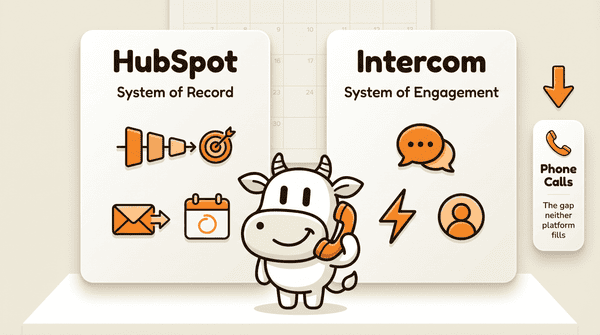
HubSpot and Intercom sit on the “website / app / email / chat” side of that problem. Phone calls are a separate gap (that’s where CallCow comes in), but your hubspot vs intercom decision decides how well you capture, track, and follow up on all the digital touchpoints around those calls.
HubSpot aims to be the central nervous system for your marketing, sales, and service teams. Intercom is built to master real-time engagement and support inside your site or product.
Let’s break down how they actually compare — with a service-business lens, not a Silicon Valley one.
HubSpot Vs Intercom: A Quick Comparison
Choosing between these two platforms isn’t just about “who has more features.” It’s a strategic call about how you want your business to grow over the next 12–36 months.
With HubSpot , you’re betting on a unified, data-driven system. Its strength is connecting every customer touchpoint, from the first website visit to a support ticket years later, back to one central record. It’s built to support long-term growth and create a consistent experience across departments.
Intercom , on the other hand, lives in the moment. It’s built for businesses that rely on instant communication: live chat, in-app messaging, and proactive support bots. Its AI and messaging workflows focus on resolving issues and engaging users quickly and personally.
Table of contents
- HubSpot vs Intercom: a quick comparison
- Comparing core business philosophies
- Evaluating key platform capabilities
- Untangling the price tag
- Choosing the right platform for your business
- Comparing user experience and learning curve
- Data, analytics, and reporting
- Technical specs, security, and support
- Integrations and tech stack compatibility
- Where HubSpot and Intercom stop: live phone calls
- Frequently asked questions HubSpot’s integrated model has resonated strongly with the market. Its annual revenue has grown into the billions of dollars, which signals broad adoption of its all‑in‑one approach compared to Intercom’s more specialized focus. You can dig into more details about HubSpot's market performance on their investor pages to see the full picture.
To make the decision clearer, here’s the “cheat sheet” version.
HubSpot Vs Intercom At A Glance
This table gives you a high-level snapshot of where each platform truly shines.
| Question | Better Fit | Why It Matters For You |
|---|---|---|
| Do you want one system for marketing, sales, and support? | HubSpot | Central CRM, email, forms, pipelines, and ticketing in one place. |
| Do most of your interactions happen inside your app or on your website chat? | Intercom | Strong in-app messaging, live chat, and behavioral targeting. |
| Do you need deep reporting on your full pipeline and revenue? | HubSpot | Detailed lifecycle analytics across marketing, sales, and service. |
| Is your priority quick, personal support conversations? | Intercom | AI-first chat, custom bots, and real-time support tools. |
| Are you a local service business with long sales cycles (legal, medical, home services)? | HubSpot (core) + Intercom (optional) | HubSpot manages the long relationship; Intercom can assist on-site conversion. |
| Are you a SaaS product whose “storefront” is your app? | Intercom (core) + HubSpot (optional) | Intercom owns in‑app experience; HubSpot can run broader marketing. |
In the end, hubspot vs intercom isn’t about which tool is “better” in a vacuum. It’s about which one fits your current business model and the way your customers actually contact you.
Comparing Core Business Philosophies
To really understand the hubspot vs intercom decision, you have to look past feature checklists. The real difference is philosophical: how each company believes customer relationships should be built.
HubSpot is all-in on the inbound methodology. The idea: you attract customers with genuinely useful content and experiences, not pushy outreach. It’s a long game focused on earning trust and turning strangers into promoters.
Because of this, HubSpot is designed as a true all-in-one system. Every piece (CRM, marketing, sales, service, website) is wired together to guide a person from “never heard of you” to “refers their friends.”
Intercom takes a different angle. Its philosophy is conversational relationships. The belief: fast, personal conversations are one of the best ways to connect with customers and grow the business. It focuses on the “here and now” of customer engagement — especially inside your product, app, or website.
HubSpot: The Integrated Growth Engine
HubSpot’s mission is to be the single source of truth for every customer interaction.
Think about a real estate brokerage using it:
-
Attract leads with blog posts on local market trends.
-
Capture inquiries through “What’s my home worth?” forms.
-
Nurture them with automated email sequences.
-
Track deals through a visual sales pipeline.
-
After closing, send follow-up check-ins and referral campaigns.
Every email, call, form fill, and ticket sits on one contact record. The whole team sees the same history. For service businesses with longer sales cycles (most law firms, clinics, home services), this end‑to‑end visibility matters a lot.
Intercom: The Conversational Catalyst
On the flip side, Intercom is built so that personal, real-time conversations are front and center.
Intercom shines as that immediate point of contact right inside your app or on your site:
-
A visitor lingers on your pricing page — a chat pops up with a helpful prompt.
-
A new user logs in and gets a guided product tour through key features.
-
A returning client opens your app and sees a targeted upgrade offer.
Intercom’s interface is tuned for fast, contextual communication. Its AI-first model puts its chatbot, Fin, on the frontline to handle a large chunk of common questions before they ever hit a human.
Strip away the feature lists and the hubspot vs intercom debate comes down to process versus conversations. HubSpot is built to refine your entire customer lifecycle. Intercom is built to increase the quality and speed of individual interactions.
You can even see this split in how they charge. A look at the HubSpot vs. Intercom pricing analysis shows:
-
HubSpot’s Service Hub has entry-level plans for small teams, with pricing that scales by contacts and feature tier.
-
Intercom uses seat-based pricing and charges extra for add-ons, so costs rise as you add people and features.
Picking the right platform starts by matching its philosophy to your main business goal:
-
Want a predictable, trackable growth system across channels? → Lean HubSpot.
-
Want to excel at one-to-one, real-time conversations in your app or on your site? → Lean Intercom.
Evaluating Key Platform Capabilities
To really evaluate hubspot vs intercom , you have to ask: “What does my team do all day, and how does each tool support that work?”
Three areas matter most for service businesses:
-
Marketing and engagement
-
Sales and intake
-
Customer support and service
Marketing Automation And Engagement
HubSpot builds its marketing on top of its CRM. That means every campaign is tied to real contact data.
Key strengths:
-
Visual workflow builder – Trigger actions from page views, form fills, email opens, and more.
-
Landing pages and forms – Capture leads without extra tools.
-
Email marketing – From simple newsletters to complex drip sequences.
-
Segmentation – Target by lifecycle stage, activity, or custom fields.
Example (illustrative):
A dental clinic could:
-
Offer a “New Patient Special” form on their website.
-
Drop new leads into a 5‑email “what to expect at your first visit” sequence.
-
Automatically assign high-intent leads to a treatment coordinator.
-
Trigger reminder tasks if someone doesn’t book after the sequence.
This kind of structured automation fits businesses with considered decisions: legal, medical, home services, financial, real estate.
Intercom, by contrast, is built around behavioral, in-the-moment marketing :
-
Send targeted messages when users hit certain pages or features.
-
Trigger in-app product tours to walk users through complicated flows.
-
Run Account-Based Marketing (ABM) campaigns to high-value accounts with targeted messages.
Example (illustrative):
A SaaS tool for property managers might:
-
Trigger a Product Tour the first time someone opens the “Create Lease” page.
-
Show a chat prompt on the “Upgrade” screen for users who visit several times without upgrading.
-
Run ABM-style campaigns to existing customers, suggesting add-on modules based on behavior.
If your “storefront” is your app and your main goal is in‑product engagement, Intercom’s approach will feel more natural.
Sales Pipeline Management Tools
When you look at sales and intake, the hubspot vs intercom differences become sharp.
HubSpot provides a full native CRM , even on the free tier:
-
Visual deal pipelines with drag‑and‑drop stages.
-
Automatic logging of emails and (with integrations) calls.
-
Tasks, reminders, and deal forecasts.
-
Custom fields for your intake process — case type, tooth number, property address, job type, etc.
Because marketing, sales, and service all share the same database, every rep can see:
-
How the lead first found you.
-
What they downloaded or viewed.
-
Every email, note, and ticket to date.
For a law firm, clinic, or HVAC company with multi‑step intake, this “single system of record” cuts down on chaos.
Intercom is more about conversational selling and lead qualification than full pipeline management:
-
Bots ask qualifying questions in real time.
-
High-intent visitors get routed straight to a rep’s calendar.
-
Sales and support teams work out of the same inbox, focused on live conversations.
Example (illustrative):
A small personal injury firm could:
-
Run a bot on their site that asks a few screening questions.
-
If the case looks promising, offer to book a consultation immediately.
-
Push the conversation into a calendar link, skipping “please fill out this form” friction.
Intercom is terrific at squeezing more value out of high-intent traffic. For deep pipeline reporting and multi‑month deal tracking, HubSpot is stronger.
Customer Support And Service Delivery
Both tools can support customer service, but they frame it differently.
HubSpot Service Hub is built around structured, ticket-based support :
-
Shared team inbox for email, chat, and forms.
-
Ticket pipelines with SLAs and automation.
-
Knowledge base builder for self‑service content.
-
Built-in CSAT and NPS survey tools.
-
Features for smooth escalation so complex issues get handed off internally without dropping the customer.
Example (illustrative):
A multi‑location medical clinic could:
-
Route appointment questions, billing issues, and lab requests into different ticket pipelines.
-
Use automation to triage messages and assign them to the right front-desk team.
-
Measure response and resolution time by clinic or issue type.
Intercom is built for conversational, AI-first support :
-
Fin, its AI chatbot, can answer a large share of common questions.
-
Real-time chat with rich context on the user.
-
Tools like cobrowsing help agents guide customers directly on their screen.
-
A unified inbox with workspaces for support, sales, and success.
Fin is especially helpful when you truly need 24/7 coverage — say, an e‑commerce store during a holiday rush, or a SaaS platform with users across time zones. While Intercom does have ticketing, its goal is to prevent many tickets by solving issues in the chat itself.
Automation, Bots, And AI
Both platforms lean heavily into automation, but their approaches differ.
HubSpot bots :
-
Handle repetitive tasks: qualifying leads, booking meetings, routing to FAQs.
-
Pull data directly from the CRM to personalize responses.
-
Hand off to humans smoothly when the issue gets complex.
-
Store collected data (name, location, service type) on the contact record.
Intercom bots :
-
Are highly configurable through a visual, code-free builder.
-
Use historical and real-time data to shape conversations.
-
Can be tuned separately for sales, marketing, and support flows.
-
Pair tightly with Fin to give AI more context and control.
If you want light automation that lives inside a broader CRM strategy, HubSpot is plenty. If your business runs on high-volume chat and you want deep control over how bots behave, Intercom pulls ahead.
Core Feature Functionality Breakdown
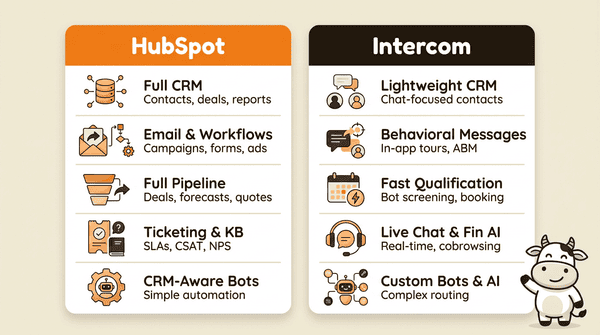
To put it into perspective, here’s a simplified feature comparison.
| Area | HubSpot Strength | Intercom Strength |
|---|---|---|
| CRM | Full contact, company, and deal management with reports. | Lightweight, focused more on people you’re chatting with. |
| Marketing | Email, workflows, landing pages, forms, ads, blogs. | Behavioral messages, Product Tours, ABM-style campaigns. |
| Sales | Pipelines, tasks, quotes, deal forecasts. | Fast qualification and meeting booking from chat. |
| Support | Ticketing, shared inbox, knowledge base, NPS/CSAT. | Real-time chat, Fin AI bot, cobrowsing, in‑app support. |
| Bots & Automation | CRM-aware bots for simple automation. | Highly customizable bots and AI for complex routing. |
If you want one system for marketing, sales, and service workflows , HubSpot leans in your favor. If your main concern is fast, personalized, AI-assisted conversations , Intercom is hard to beat.
Untangling The Price Tag: What HubSpot And Intercom Really Cost
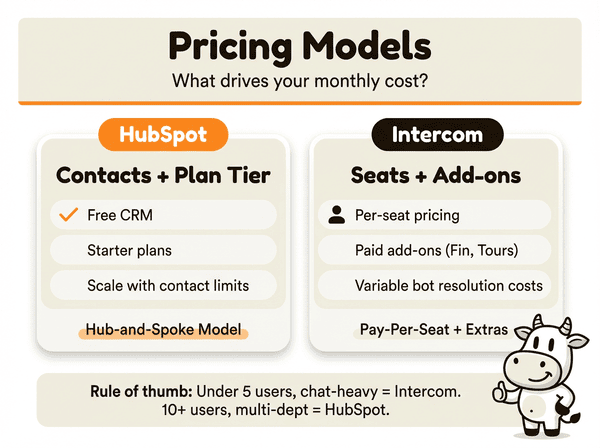
When you compare hubspot vs intercom pricing, you’re really comparing two different ideas of cost:
-
HubSpot: cost scales mainly with contacts and plan tier.
-
Intercom: cost scales mainly with the number of seats and paid add-ons.
The “cheap” choice for a three-person startup can get expensive once you have 15+ staff and thousands of contacts, and vice versa.
HubSpot’s Pricing: The “Hub-And-Spoke” Model
HubSpot pricing is built around Hubs: Marketing, Sales, Service, CMS, Operations, all sitting on top of a free CRM.
Two main levers drive cost:
-
Plan tier for each Hub (Starter, Professional, Enterprise).
-
Contact limits and extra seats in those Hubs.
Typical pattern:
-
You start on the free CRM.
-
Add Starter plans for the areas you care about (e.g., Service + Marketing).
-
As you grow, you move up tiers and pay more for higher contact limits and advanced features.
This model works well for businesses that:
-
Have multiple teams using the system.
-
Want everyone in one CRM without paying per seat for basic visibility.
-
Prefer pricing that grows in a predictable way with their contact base.
Intercom’s Pricing: The “Pay-Per-Seat + Add-Ons” Model
Intercom keeps its base pricing simple: you pay per seat, with Starter plans aimed at small teams.
The complexity kicks in with:
-
Extra seats.
-
Paid add-ons like Product Tours, advanced surveys, and Fin.
The real cost of Intercom often isn’t in the seats; it’s in the extras. Features like Product Tours, advanced surveys, and Fin all have separate charges. Fin, for example, is billed per resolution, so a busy support team can rack up costs quickly.
This model is great when:
-
You have a focused support or sales team.
-
Only a few people need to log in.
-
You’re okay with variable costs tied to how often bots and surveys are used.
It’s trickier when:
-
You expect to add lots of agents.
-
You need many of the higher-end features.
-
You need tight control over budgets.
Cost In The Real World: Startup Vs. Scaling Company
Let’s run two simplified scenarios. Actual pricing will depend on specific plans and discounts, but the direction is what matters.
Scenario 1: The Lean Startup
-
Team: 3 people (2 support, 1 marketing)
-
Needs: Live chat, shared inbox, basic email marketing.
Intercom:
-
Starter plan can handle chat and basic support efficiently.
-
Great if your website/app is where all the action is.
HubSpot:
-
Free CRM covers contact management and logging.
-
Add low-cost Starter Hubs for marketing emails and a simple ticketing system.
-
Strong “we’ll grow into this” platform if you expect to add sales pipelines later.
Scenario 2: The Scaling Mid-Sized Company
-
Team: 25 people (10 sales, 5 support, 5 marketing, 5 ops)
-
Needs: Full CRM, sales pipeline, advanced automation, and ticketing.
HubSpot:
-
All 25 can use the free CRM for basic visibility.
-
You pay for the Hubs that need paid features.
-
Tiered pricing helps avoid surprise jumps as headcount increases.
Intercom:
-
Paying per-seat for dozens of users adds up fast.
-
Add-ons required to match HubSpot’s breadth will increase monthly spend.
-
Great for support-heavy teams, but less efficient if you want everyone inside the tool.
As a rough rule of thumb:
-
Under ~5 active users, chat-heavy? Intercom often feels cheaper and more focused.
-
10+ users across multiple departments? Total cost of ownership often favors HubSpot.
Choosing The Right Platform For Your Business
When you stack hubspot vs intercom , don’t start with features. Start with:
-
How your customers find you.
-
Where the most important conversations happen.
-
How long your sales cycle actually is.
What works beautifully for a fast-moving SaaS company can feel wrong for a local clinic or law firm.
“The purpose of a business is to create and keep a customer.” — Peter Drucker
The right choice is the one that helps you create and keep those customers in the way that fits your model.
Here's how that looks for a few typical business types.
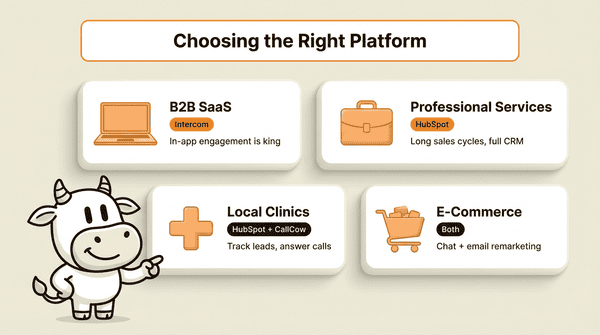
The Verdict For B2B SaaS Companies
If you’re running B2B SaaS, your customer’s world is your product. Onboarding, upsells, support. They all live in your app.
That’s Intercom’s home turf.
Intercom excels at:
-
Smart, targeted in-app messages.
-
Product Tours that teach features as people use them.
-
AI support via Fin that answers technical questions on the spot.
Intercom is often the stronger first choice if winning or losing a customer depends on how they experience your product in the first week.
HubSpot can still play a key role in:
-
Top-of-funnel marketing.
-
Long-term customer education.
-
Sales pipelines for larger deals.
But if your main concern is activation and in‑product expansion, Intercom should be the first thing you evaluate.
The Winner For Professional Services
Now swap SaaS for professional services: law firms, marketing agencies, accounting practices, real estate brokerages.
Here, the sales cycle is usually long and based on trust:
-
Many touchpoints over weeks or months.
-
Lots of back-and-forth before someone signs.
-
Heavy emphasis on follow-ups and referrals.
This is where HubSpot’s all-in-one CRM platform stands out.
An agency or firm can:
-
Build complex email sequences to educate and nurture leads.
-
Track every consultation and follow-up as a deal in the pipeline.
-
Measure conversion rates from inquiry to signed client.
-
Use Service Hub to manage ongoing client questions and tickets.
For these types of businesses, HubSpot is usually the more effective “home base.” Intercom can still help with on-site chat, but it doesn’t replace a full CRM.
Best Fit For Local Service Businesses And Clinics
If you’re a plumber, electrician, HVAC owner, dental clinic, vet, or medical practice, your reality is different again:
-
Many leads still call first.
-
But more and more people will also chat, fill out forms, or email.
-
Appointments and jobs can be worth hundreds or thousands of dollars.
For you:
-
HubSpot is usually the backbone for:
-
Tracking new leads.
-
Driving reviews and referrals.
-
Running recall campaigns (e.g., dental hygiene reminders).
-
-
Intercom is optional but useful if:
-
Your website does a lot of heavy lifting.
-
You want to catch late-night questions via chat.
-
Just remember: neither one answers your phone. We’ll come back to that when we talk about CallCow.
Best Fit For E‑Commerce Businesses
E‑commerce sits somewhere in between.
You need:
-
Fast answers to pre‑purchase questions.
-
Strong post-purchase email and remarketing.
On the front end , Intercom is strong:
-
Live chat and AI bots handle questions about shipping, returns, and stock.
-
Proactive chat can reduce abandoned carts — one study found proactive chat can increase conversion rates by up to 10%.
On the back end , HubSpot shines:
-
Segment customers by products bought, order value, or purchase frequency.
-
Run replenishment campaigns, win‑back offers, and VIP sequences.
-
Tie marketing performance back to revenue, not just clicks.
So which one?
-
Struggling with abandoned carts and decision friction? → Start with Intercom.
-
Struggling with repeat business and loyalty? → HubSpot is a better foundation.
-
Established and growing? → Many brands run Intercom for on-site chat and sync that data into HubSpot for long-term marketing.
Comparing User Experience And Learning Curve
The next angle in the hubspot vs intercom comparison is simple: how hard are these tools to live in every day?
HubSpot: Broad, Powerful, And Heavier To Learn
HubSpot’s interface is consistent and polished across Hubs, but there’s a lot in there. New users will face:
-
Multiple sections: Contacts, Deals, Tickets, Marketing, Reports, etc.
-
Many settings and options for each Hub.
-
A learning curve for building workflows and custom reports.
For a solo operator or very small team, this can feel like a lot at first. The tradeoff is:
-
Once you learn it, every part of your customer experience is in one place.
-
You don’t jump between four different tools every day.
HubSpot softens the learning curve with:
-
Built-in templates.
-
Guided setup for common use cases.
-
Extensive training through HubSpot Academy.
Intercom: Clean, Conversational, And Focused
Intercom is praised for its minimal, chat‑centric interface:
-
One primary inbox for messages.
-
Clear, conversational UI.
-
Dedicated workspaces for different teams (support, sales, success).
It’s easier for new support reps to start answering tickets in Intercom on day one than it is to master all of HubSpot.
Dig deeper into complex bots, routing rules, and Product Tours, and Intercom can get complex too. But if most of your day is spent in chat, its design feels very natural.
For most small teams:
-
Need one tool that can grow into full CRM and marketing? → Accept HubSpot’s learning curve.
-
Need a fast, intuitive chat tool for a focused team? → Intercom will feel lighter.
Data, Analytics, And Reporting: What You Can Actually See
Both tools collect a lot of data. The difference is what they emphasize.
“Without data, you’re just another person with an opinion.” — W. Edwards Deming
The right reporting makes your marketing and support decisions less about gut feel and more about evidence.
HubSpot: Full-Funnel Analytics
HubSpot’s reporting is built to answer questions like:
-
“Which campaigns generate the most new patients / cases / jobs?”
-
“How many leads became customers this month?”
-
“What’s our revenue by source, by rep, by service line?”
You can:
-
Build custom dashboards for owners, marketing, and front desk.
-
Track KPIs like contact-to-customer conversion rate, pipeline value, and ticket resolution time.
-
Report across the full lifecycle: lead → deal → customer → repeat customer.
For a service business owner who wants to understand where revenue is coming from , HubSpot is hard to match.
Intercom: Engagement And Support Analytics
Intercom’s analytics zoom in on engagement and support:
-
How many conversations you handle per day.
-
Average response and resolution times.
-
Which messages and Product Tours perform best.
-
How users move through key in‑app flows.
You’ll get a clear view on:
-
“Are we responding fast enough?”
-
“Where do users drop off in onboarding?”
-
“Which campaigns actually get people to use feature X?”
If your biggest question is “How are people using our product and how well are we supporting them in the moment?”, Intercom gives very strong answers.
Technical Specs, Security, And Support
For many small teams, this section isn’t the main decision driver, but it matters if you’re working with patient data, legal matters, or larger clients.
Platform Coverage And Languages
-
HubSpot
-
Works on web, Windows, Mac, Linux, Android, and iOS.
-
Supports multiple languages (including English, Spanish, French, Portuguese, Chinese, Dutch).
-
Open API for custom integrations.
-
-
Intercom
-
Web-based, plus desktop and mobile apps.
-
Officially focused on English.
-
Strong API and SDKs for embedding in apps.
-
If you have a distributed, multilingual team, HubSpot’s language support may be appealing.
Security And Compliance
Both platforms:
-
Encrypt data in transit and at rest.
-
Offer role-based access controls.
-
Comply with major regulations like GDPR and CCPA.
-
Provide detailed audit and security documentation.
For clinics and medical practices, remember:
-
Neither tool, by itself, makes you “HIPAA-compliant.”
-
You still need your own policies, BAAs where applicable, and careful configuration.
-
When we talk about CallCow, we use the term “HIPAA‑conscious,” not “HIPAA‑compliant,” for the same reason.
Support Channels
-
HubSpot
-
Knowledge base, community, and email/chat support for Starter.
-
Adds phone support at Professional and Enterprise tiers.
-
Generous trial options on many products.
-
-
Intercom
-
Help Center, live chat, and account managers on higher plans.
-
Strong documentation and education material.
-
Short free trial so you can test the fit.
-
For many small businesses, the quality of onboarding resources and how fast you can get help matters as much as features.
Exploring Integrations And Tech Stack Compatibility
A software platform is only as effective as the tools it connects to. On this front, hubspot vs intercom shows two different philosophies:
-
HubSpot wants to be the center of your tech stack.
-
Intercom wants to sit where conversations happen and pull in context from other tools.
HubSpot: The Grand Central Station Of Your Tech Stack
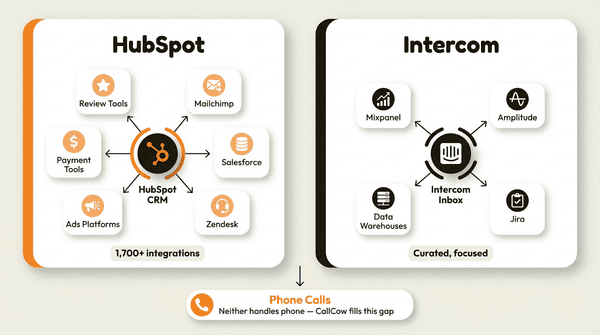
HubSpot’s App Marketplace is large — over 1,700 integrations.
The idea: any customer data, from any reasonable tool, should sync into HubSpot CRM.
Examples:
-
Email tools like Mailchimp.
-
CRMs like Salesforce (for hybrid setups).
-
Support tools like Zendesk.
-
Ads platforms, payment processors, survey tools, and more.
Features like Data Sync help keep records updated across tools so your team isn’t copy‑pasting data all day.
For a service business, that can look like:
-
Booking software pushing appointments into HubSpot.
-
Accounting systems tagging high‑value clients.
-
Review tools sending NPS scores back to contact records.
Intercom: A Curated, Purpose-Built Integration Set
Intercom runs a smaller, more focused marketplace.
It centers on tools that make conversations smarter:
-
Engineering tools like Jira.
-
CRMs and data warehouses that add context to chats.
The focus is not “connect to everything,” but “give your agents maximum context while they’re talking to customers.”
Using HubSpot And Intercom Together
There’s also a middle path: use both.
Intercom has a HubSpot integration that:
-
Shows HubSpot data inside Intercom Inbox.
-
Syncs users, leads, and companies between platforms.
-
Lets you push conversations from Intercom into HubSpot contact records.
In practice, that means:
-
Support teams live in Intercom.
-
Sales and marketing teams live in HubSpot.
-
Everyone still looks at the same underlying customer data.
Filling The Gaps With The Right Third-Party Tools
Neither platform handles phone calls with AI out of the box. That’s a big missing piece if you:
-
Can’t always pick up the phone.
-
Operate across time zones or after hours.
-
Want consistent intake and qualification on every call.
This is where a service like CallCow fits with either tool.
Example (illustrative):
-
A real estate firm running on HubSpot uses CallCow as an AI receptionist.
-
CallCow answers calls 24/7.
-
It identifies itself as AI at the start of each call.
-
It qualifies leads, books showings, and logs outcomes into HubSpot via Make, Zapier (invite-only), or webhooks.
-
-
A SaaS company using Intercom has CallCow handle after-hours support calls.
-
Instead of voicemail, CallCow gathers the issue.
-
It creates a detailed ticket in Intercom.
-
Human agents see clean, structured notes when they start their shift.
-
The pattern is the same: HubSpot or Intercom handle digital channels; CallCow catches the phone calls you can’t answer.
Where HubSpot And Intercom Stop: Live Phone Calls And CallCow
No matter who “wins” for you in the hubspot vs intercom decision, both tools share one limitation:
They don’t pick up the phone when a new lead calls during a job, a surgery, or after hours.
If you’re a service business, that’s where a lot of your revenue sits.
The Real Cost Of Missed Calls
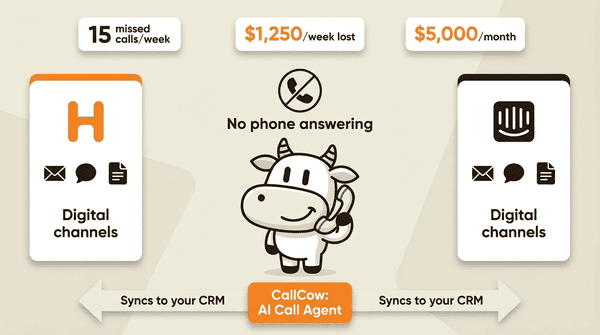
Run a simple back-of-the-envelope calculation (illustrative):
-
15 missed calls per week.
-
1 in 3 would have booked.
-
Average job or first visit value: $250.
That’s 5 lost jobs × $250 = $1,250/week , or roughly $5,000/month.
You can have the perfect chat setup, clean CRM, and strong email flows — but if those calls go to voicemail, the numbers still hurt.
If that math looks familiar, see how CallCow catches those missed calls.
How CallCow Works With HubSpot Or Intercom
CallCow was built for exactly this gap:
-
Always introduces itself as AI at the start of each call.
-
Recommends voicemail forwarding as the default setup: AI handles calls only when you don’t pick up, so callers still reach a human first. (Setup guide)
-
Answers common questions (hours, services, insurance, pricing ranges).
-
Collects structured lead data using custom forms (name, email, service type, preferred time) that flow directly into your CRM via webhooks.
-
Answers in a cloned version of your voice, trained from a 30-second recording.
-
Builds a contact database automatically from every caller and texter, with two-way SMS built in.
-
Books appointments or estimates using Calendly, Cal.com, TidyCal, Trafft, Google Calendar, or Outlook Calendar.
-
Sends structured call summaries into HubSpot or Intercom via Make, Zapier (currently invite-only), Monday.com, or webhooks (no custom code required).
-
Offers embeddable website widgets so visitors can trigger an AI call directly from your site.
For medical and dental clinics, CallCow is HIPAA‑conscious :
-
It’s designed to avoid unnecessary PHI.
-
You control what information is asked for and stored.
-
You still own the responsibility for your overall compliance posture.
If you’re already paying for HubSpot or Intercom, adding CallCow is often about recovering revenue you’re already generating demand for , not creating demand from scratch.
Want to see it in action? Browse the CallCow docs or book a setup call.
Frequently Asked Questions
Choosing between HubSpot and Intercom almost always raises a few common questions. Here are the main ones.
Can I Use HubSpot And Intercom Together?
Yes. Many teams do.
A common setup:
-
Intercom handles live chat and in‑app support.
-
HubSpot holds the master CRM, marketing, and sales pipeline.
-
Intercom conversations, users, and companies sync into HubSpot.
You get the best of both:
-
Support has a tool tuned for real-time messaging.
-
Sales and marketing get full customer history in one CRM.
This hybrid setup is especially strong if you’re SaaS with a service element (e.g., property management platforms, telehealth, or education).
Which Platform Is Better For A Small Startup?
It depends what hurts more right now.
-
If your priority is engaging users in your app or on your website chat , Intercom’s focused tools are hard to beat.
-
If your priority is building a foundation for marketing, sales, and service from day one, HubSpot is usually the better long-term bet.
For a startup, the key question is: do you need a powerful conversational tool first (Intercom), or a core platform to run growth across channels (HubSpot)? The “right” answer is the one that fixes your most expensive problem this quarter.
How Difficult Is It To Migrate Between Platforms?
Moving between HubSpot and Intercom is not a one-day project.
Most common path:
- Intercom → HubSpot
-
Happens when a company outgrows chat-only tools and needs full CRM, marketing automation, and strong reporting.
-
You’ll plan data exports, field mapping, and process changes.
-
Less common path:
- HubSpot → Intercom only
-
Rare because you give up deep CRM, sales, and marketing capabilities.
-
More common is adding Intercom for chat while keeping HubSpot as the CRM.
-
If you’re heavy on both chat and structured pipelines, the real move is often “add the missing tool” rather than a full migration.
Do HubSpot Or Intercom Replace A Phone Answering Service?
No.
Both tools can:
-
Power chat on your website.
-
Handle contact forms and emails.
-
Manage workflows and follow-up.
Neither tool answers incoming calls.
If missed calls are your most expensive leak, you’ll still need:
-
Human receptionists,
-
A call center, or
-
An AI call agent like CallCow.
If you want to see what that looks like in practice, browse the CallCow docs or book a setup call.
The smart move for most service businesses is:
-
Use HubSpot and/or Intercom for digital channels.
-
Use CallCow to catch the calls you can’t pick up and send structured data back into your systems.
If you remember nothing else from the hubspot vs intercom discussion, make it this:
-
HubSpot is your system of record for the full customer lifecycle.
-
Intercom is your system of engagement for real-time, in‑app and on‑site conversations.
-
CallCow is your system for phone calls you can’t answer — tying those calls back into whichever platform you choose, so fewer leads slip away.